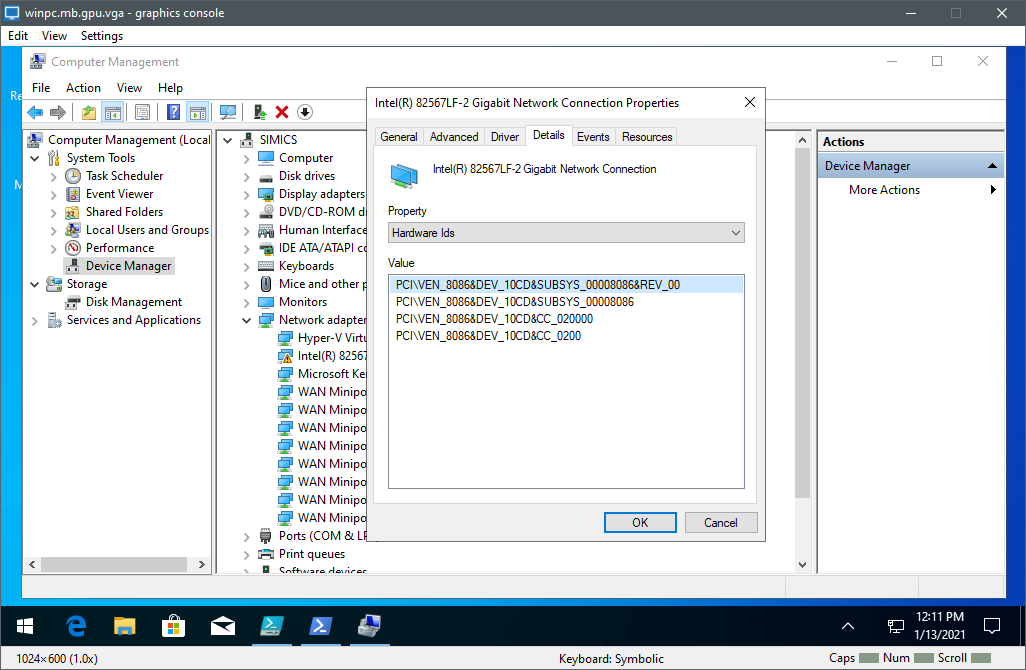
Figure 2. Checking PCIe ID using Windows Device Manager.
To make debug over the network work, the target system needs to use a network card that WinDbg recognizes. The current list can be found at https://docs.microsoft.com/windows-hardware/drivers/debugger/supported-ethernet-nics-for-network-kernel-debugging-in-windows-10. Basically, all released Intel network cards are supported. The key here is released - models of not-yet released network cards are typically not supported by Windows. Thus, for targets not yet available in hardware you have to add a PCIe-attached network card that WinDbg knows about - like an i350 or i210.
On a Windows target running with a desktop available, you can check the PCIe ID using Windows Device Manager. Find the network device, open properties, and check the details for the hardware IDs. Figure 2 shows an example from Windows 10 on a QSP-x86 target.
You can also check for the PCI device ID of a network by using the Powershell command Get-PnpDevice. Look for the line "DeviceID" after the name of the network device appears (often, there are many virtual devices that also get listed by this command):
> Get-PnpDevice -Class "Net" | fl Caption : Intel(R) Ethernet Connection (3) I219-LM Description : Intel(R) Ethernet Connection (3) I219-LM InstallDate : Name : Intel(R) Ethernet Connection (3) I219-LM Status : Unknown Availability : ConfigManagerErrorCode : CM_PROB_PHANTOM ConfigManagerUserConfig : False CreationClassName : Win32_PnPEntity DeviceID : PCI\VEN_8086&DEV_15D7&SUBSYS_224517AA&REV_21\3&11583659&0&FE
From Simics side, you can check the PCIe ID using one of the
print-pci-config-regs and print-device-regs commands.
For example, network card on a QSP-x86 target
(PCIe ID 0x10CD is supported according to Microsoft):
simics> board.mb.sb.lan.print-pci-config-regs
PCI configuration registers for board.mb.sb.lan [class ich10_lan_v2]
====================================================================

Generic Registers:
              Vendor ID :     0x8086
              Device ID :     0x10cd
                Command :     0x0416
                 Status :     0x0010
            Revision ID :       0x00
             Class Code :   0x020000
        Cache Line Size :       0x00
          Latency Timer :       0x00
            Header Type :       0x00
                   BIST :       0x00
         Base Address 0 : 0xf1000000
         Base Address 1 : 0xf1023000
         Base Address 2 : 0x00000001
         Base Address 3 : 0x00000000
         Base Address 4 : 0x00000000
         Base Address 5 : 0x00000000
        Cardbus CIS Ptr : 0x00000000
    Subsystem Vendor ID :     0x8086
    Subsystem Device ID :     0x0000
     Expansion ROM Base : 0x00000000
       Capabilities Ptr :       0xc8
         Interrupt Line :       0x00
          Interrupt Pin :       0x01
                Min Gnt :       0x00
                Max Lat :       0x00
simics> print-device-regs board.mb.sb.lan pattern = "device_id"
Bank: pci_config
Offset  Name       Size   Value
-------------------------------
   0x2  device_id     2  0x10cd

simics> print-device-regs board.mb.sb.lan pattern = "*id"
Bank: csr
Offset  Name  Size  Value
-------------------------
0x2c08  raid     4    0x0

Bank: pci_config
Offset  Name         Size   Value | Offset  Name                 Size   Value
----------------------------------+------------------------------------------
   0x0  vendor_id       2  0x8086 |   0x2c  subsystem_vendor_id     2  0x8086
   0x2  device_id       2  0x10cd |   0x2e  subsystem_id            2     0x0
   0x8  revision_id     1     0x0 |