This chapter describes how to write your own Simics components. It assumes you
have already read the section about components in the Simics User’s Guide,
particularly for the definitions.
A component represents a piece of hardware which connects to other parts of the
system through standardized interfaces. The primary purpose of a component in
Simics is to manage and encapsulate the complexity inherent in composing a
system. Frequently, a component represents a piece of hardware which can be
removed from the system and put back in without breaking it or the rest of the
system. Some manufacturers refer to this sort of hardware as a Field Replaceable
Unit or FRU. Whether modeling FRUs or not, the definition of components should
closely follow the structure in the real system. Some examples of real hardware
that are generally modeled using components are motherboards, compact flash
cards, disks, SOCs, and PCI cards.
Components are assembled to construct systems through two primary mechanisms:
nested namespaces and connectors. A system will usually use both mechanisms.
Namespaces are used to encapsulate parts of the system which from the outside
can be considered one unit and connectors are used to connect the components to
each other similar to how the real hardware is connected, for example memory
slots, PCI slots, Ethernet sockets. When there is a tight coupling between a
component and a subcomponent, for example between a board and an SOC, the
component can set up the subcomponent and the connections between the two
components without using connectors.
Consider a system consisting of a compact PCI chassis with a processor board and
several I/O boards. The system runs a single operating system image and is
considered a single machine; however, each board is clearly a separate entity
from the others and from the chassis. Here, you would use simple connections
between the components, with one component for each board and one for the
chassis.
Now consider the processor board consisting of an integrated processor SOC,
several discrete devices, RAM, and flash. Here, the SOC is clearly a reusable
system with sufficient complexity that it should be encapsulated in a component,
but the board is meaningless without the SOC. Thus a component should be used to
represent the SOC, with the board being a component that contains the SOC. Since
the board has such a strong dependency on the SOC it does not need to use a
connector to connect to it, instead it can create the SOC component itself and
set up the connections manually.
Namespaces are described in section 26.2, while component
hierarchies are described in 26.3. To summarize, a
namespace composition is used to describe components that consists of other
components, while connectors are used to connect components to each other.
A component is a generic Simics class, with the special ability to contain
class instances. Each instance of a component represents a namespace described
in section 26.2.1. In this chapter, we will refer to a component
instance as a component, and the class instances within the component as
objects.
More specifically, a component class is a Simics class written in Python that
implements the component interface. Details of writing components are
described in section 26.6. The component interface is
documented in section 26.8.1.
A number of ready to use components are provided with Simics. Some of these are
standard components that can be used in many kind of systems. Examples of
standard components are disks, flashes, text consoles, etc. Other components are
specific to a particular system, such as an evaluation board.
A component module is a Simics module containing the implementation of one or
more related components. The examples-comp module, for example, contains a
set of example components. It will be used as an example in the following
sections. It can be found at [simics]/src/components/.
Additional examples of flat components that do not support hierarchical
composition can be found in the [simics]/src/extensions directory. These
components are still supported, but they will not be discussed in this chapter.
When adding a component to a project, the component module source directory is
placed in [project]/modules/component_module_name, and contains one
component_module_name.py file, one Makefile and optionally one PNG image
file for each top-level component.
The Makefile is essentially identical for all component modules; it simply
points out the .py file that is part of the module. Section
26.6 describes how to create new components.
All components also define their own namespace for other components and objects.
Placing a component in another component’s namespace is used to model systems
composed of reusable subsystems that do not individually stand alone.
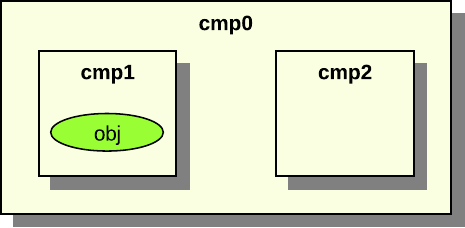
Figure 27. Example of a namespace hierarchy
Figure 27 shows an example system with one root
component called cmp0 with two sub components, cmp1 and cmp2. The cmp1
component contains the obj object. Each component has a separate namespace.
The namespaces form a tree of components. The cmp1 component is in the cmp0
component’s namespace.
All objects have a name. For objects in the global namespace the name is simply
a string given at its creation. Objects in other namespaces have names that
depend on their location in the hierarchy. These names depend on which slot in
the parent the object is placed in.
Slots are something all components have, and which mainly define the names of
its children. Each slot has a name and a value. The value is often just an
object reference. Other possible values are None or nested lists with objects
references and Nones as elements. A slot with None value is called an
unoccupied slot.
An object in a component has a local name and a full name. The local name is
called slot name or simply slot. An object’s slot name is the name of the slot
it belongs to concatenated with its index in the slot. Assume that a component
cmp has the slot sub with an object reference to the object A. The object
A has the slot name sub and the full name cmp.sub. Now assume that the
component cmp has the slot sub with a list of two object references to
object B and object C. The object B has the slot name sub[0] and the
full name cmp.sub[0].
In figure 27 the sub components names are actually
the slot names. Both cmp1 and cmp2 are slots in cmp0. The cmp1 component
in figure 27 has the full name cmp0.cmp1. All
object names in the figures in this chapter are local names.
A component can be connected to components on the same hierarchical level or to
a parent or child component; see section 26.4.
Component namespaces provide scoping for names in a manner similar to syntactic
blocks in programming languages. As with programming structure, it is easier to
understand when a minimal number of names are defined in the global scope or
namespace. Another good analogy is a file system directory structure.
A component or object can be added to a component’s namespace on definition, or
after creation at run-time using the move-object command.
Ex. move component cmp1 to cmp0 as "cmp1":
simics> move-object src = cmp1 dst = cmp0.cmp1
Moving an object to a component puts the object in its namespace. This is done
by putting the object in a slot in the component. The object can now be accessed
relative to the parent component in CLI, Python, or in the Simics API.
Moving an object to a different hierarchical location changes its full name. The
cmp1 is now accessed using the hierarchical name cmp0.cmp1, the slot name is
cmp1.
Ex. execute info command for cmp1 in CLI:
simics> cmp0.cmp1.info
Ex. access queue attribute for cmp1 in CLI:
simics> cmp0.cmp1->queue
Ex. access queue attribute for cmp1 in Python:
simics> @conf.cmp0.cmp1.queue
Ex. get cpu object from cmp1 in Python:
simics> @conf.cmp0.cmp1.cpu
A normal object can only exist in one namespace at a time; only connector
objects can exist in several namespaces. Connector objects are documented in
section 26.4.2. Connector objects can be copied to a new
namespace using the copy-connector command.
Ex. copy connector object cmp0.cmp1.port0 to cmp0 as "copy0":
simics> copy-connector cmp0.cmp1.port0 cmp0.copy0
The connector object can now be accessed as cmp0.copy0 or cmp0.cmp1.port0,
and has two parents. The owner of the connector object is not changed and is
still the cmp0.cmp1 component.
The component interface has functions to add and remove objects from a
components namespace, which is used by the move-object and copy-connector
commands.
The alias command can be used to avoid having to write the complete
hierarchical name several times for often-used objects:
Ex. alias for cmp1 in CLI:
simics> alias short cmp0.cmp1.port0
simics> short.info
Objects, attributes, and commands sometimes share the same namespace name,
resulting in conflicts. Consider a root component named cmp0 with an object in
slot cpu and also has a command called cpu that prints all processors in the
components. There will be a conflict when typing cmp0.cpu on the command
line.
You should try to avoid such name conflicts, and Simics will print a warning
message if any are detected. If there are conflicting names, the following
precedence describes how the name is interpreted.
The order in decreasing precedence is:
slots,
attributes, and
commands.
Thus continuing the example above, cmp0.cpu is an object reference, not a
command.
To model how the parts of a system are connected to each other components are
connected to each other using connectors. The connectors allow you to build a
system that consist of reusable components. The connections form a graph
separate from the namespace hierarchy.
Components in the global namespace which represent systems of interest to the
user should be top-level components. A top-level component’s main responsibility
is to provide informational metadata in some standardized attributes which are
mainly used by Simics’s graphical tools; see the details in
26.8.3. The user can set which components he wants as
top-level components when he configures the system. For example, a compact PCI
form factor single board computer can either be the top-level component in a
standalone system or part of a chassis based system, where the chassis would be
the top-level component.
Components can connect to other components via connector objects (described in
more detail in section 26.4.2). The connector objects used for
connecting components must implement the connector interface. The connector
interface description can be found in section 26.8.1.
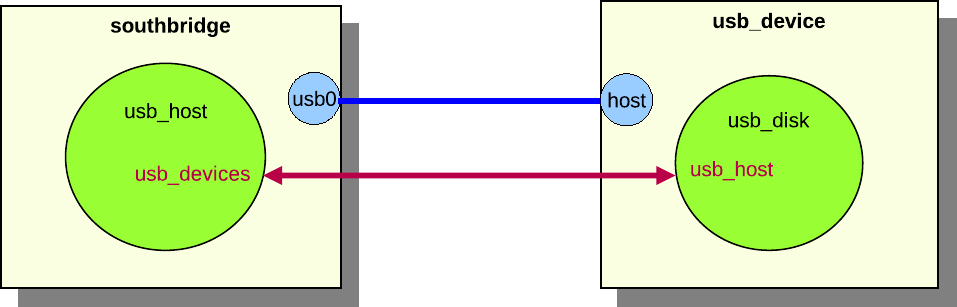
Figure 28. Example component
connection
In figure 28, the southbridge component is
connected to the usb_device component. The southbridge component contains
the usb_host object, and the usb_device component contains the usb_disk
object. It is the components that set up the connection through their
connectors, but it is the usb_host and usb_disk objects that are connected
via interfaces. The usb_host object has a usb_devices attribute that
connects to the usb_device interface on all connected usb device objects. The
usb_disk object has a usb_host attribute that connects to the usb
interface of the host object. Data exchanged during the connection process sets
the attributes to appropriate values. A component connection between two
components can exchange data to set up multiple attributes for several objects
in the components.
A component connector has several properties that define the type of connection.
The properties are defined in the connector interface, which is implemented by
all component connectors.
Components have connectors of different types.
Two connectors can only be connected if the types are identical. The most
common types are standard hardware connectors such as Ethernet and serial.
A connector is hotpluggable if the
connector supports connecting and disconnecting after the component has been
instantiated. For example, a USB device connector is often hotpluggable, while
a processor connector usually is not.
A connector that is required must be
connected when the component is instantiated, otherwise an error will be
generated. Processor connectors on board components are often required as the
system cannot be set up without a processor.
The direction is either up, down or
any. It is only possible to connect connectors of different
directions. The direction of a connection determines if the connection
defines the two components as part of the same connected tree or not. Up and
down connectors imply that the connector defines a tree relationship, while
any connectors do not imply any tree relationship. Additionally, the
direction defines the order in which components in a component tree are
instantiated. The top-level component is visited first, and then all
components that are connected to its down connectors. This process is
continued recursively until all components in the tree have been visited.
A top-level component is not allowed to have any up connectors, and its any
connectors can only be connected to other up connectors. Top-level components
must also be root components of their hierarchies.
Component connector objects are normal Simics objects that implement the
connector interface. Connector objects contain only the functionality needed
to set up the connections between objects within the components they connect.
Connector objects are explicitly defined in the component class. The connector
objects will be created when an instance of the component class is created.
Defining a connector will automatically put the connector object in its
component’s namespace, i.e., all connectors will exist in a slot in a component.
A component can inherit another component’s connectors. This can either be done
using the copy-connector command at run-time, as described in section
26.2.1, or when defining a component, as described in section
26.6.11.
Component connectors are connected using the connect command, which takes the
two component connector objects as parameters.
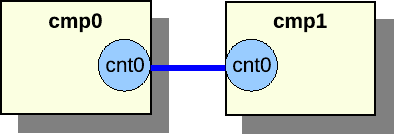
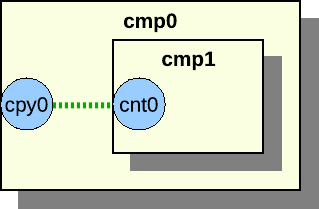
Ex. connecting cmp0 and cmp1 in figure :
simics> connect cmp0.cnt0 cmp1.cnt0
Figure 29. Component connection between
components on the same level
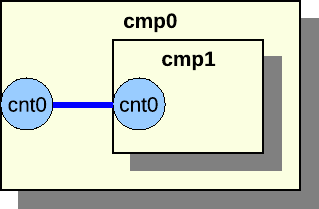
Figure 30. Component connection between
component parent and child
Two components can only be connected if they are siblings in the namespace
hierarchy or if they are parent and child. The former is illustrated in figure
29, the latter in figure 30.
When making a component into a sub component of another component, it is often
desirable to expose the sub component connectors as connectors of the parent
component. This is very simple, as it is possible to add a reference to the sub
component’s connector to the parent component.
Figure 31. Connector reference
Assume we have two components, cmp0 and cmp1. The cmp1 has a connector
object named cnt0. First add cmp1 to cmp0 and then add a reference:
The legacy Ethernet link component using the std-ethernet-link class is not
compatible with the new hierarchical components. The new Ethernet link
components ethernet_cable, ethernet_hub, and ethernet_switch should be
used with hierarchical components.
A component goes through several phases, from creation to fully instantiated
component connected to other components with a lot of sub components and
objects.
The first step to become a
full-grown component is to be created. A component can either be created as a
non-instantiated component or as an instantiated component. A component can
only be created and instantiated in one command if it does not contain any
required connectors. When setting up a system it is most common to create
non-instantiated components, so we will focus on this in this section.
Once the component has been created
it is time to initialize it. It is now possible to set the component
attributes that were not set when the component was created.
The next step in the life of a
component is to look at the surroundings and connect to other components. All
required connectors must be connected. It is a good idea to also connect all
optional connectors.
When all connections are set
up, it is time to become instantiated. In the instantiate phase all objects in
the component and all connected components are created. This must be done
atomically, as objects might have attributes pointing to objects in other
components in the tree.
The components are created using the create-name-of-component command, which
will create a non-instantiated component.
The first argument to the create- command is the name of the component. The
component’s default name will be used if the name is not provided when creating
the component. The default name is defined by the basename class attribute.
The basename attribute is set to component for all components that are based
on the StandardComponent class, but it can be overridden in the inheriting
class.
The remaining arguments to the create- command are the config attributes, see
section 26.6.6. The config attributes are either
required or optional. All required attributes must be set when the component is
created.
All attributes that were not set during the creation phase, but should be set,
are set in the setup phase. Some attributes might depend on other components or
one script creates the component and another script sets up the components.
All required connectors must be connected before the component is instantiated.
Required connectors might for instance be connectors for connecting a processor
to a board. The objects on the board component require the processor object in
the processor component to function.
The component can be instantiated when all connectors have been connected. The
instantiation process will collect all pre objects in the component and create
new real objects to replace the pre objects.
The component interface has two functions that will be called in the
instantiate process. The pre_instantiate function will be called right before
the component is instantiated. The function returns True if the component is
allowed to be instantiated. The post_instantiate function will be called right
after the component is instantiated. This function is a good place to add code
that requires real objects from the component.
This section describes how to implement components. All examples in this section
are fully functional and are included in the examples-comp module. To test the
examples, start the vacuum target machine and load the examples-comp module.
The source code for the component examples can be found in
[simics]/src/components/examples-comp/examples_comp.py.
This will create skeleton code for a new component in the
[project]/modules/my-own-component/ directory, with all files needed to build
it as a Simics module.
Simics includes the comp Python module that greatly simplifies writing
components. The module contains all functionality needed for creating a
component.
The comp module and its classes and methods are documented in section
26.11. This help for writing components is only available in
Python, as Python is the only language supported for writing components.
To use the comp module, make sure your Python file contains:
from comp import *
The comp module contains the StandardComponent class that should be used as
base class when creating new components. The class contains a lot of useful
methods and parameters to define a new component. The comp module also
contains other classes that are based on the StandardComponent class. These
classes will be described later.
Here is an example of how to create a simple component:
import simics
from comp import *

class emmett(StandardComponent):
    """The long description for the Emmett component."""
    _class_desc = 'short Emmett description'
In the example we create the component class emmett. The first string in the
class is a long description of the component that can be several sentences. The
_class_desc is a short class description beginning with lower case, without
trailing dot, and at most 50 characters long. The longer description is used in
the help commands and reference manuals, while the shorter description is used
for example in the GUI to describe the component.
Upon registration, the newly defined component registers itself as a common
Simics class which allows instances of it to be created like for any other
Simics object. By inheriting the StandardComponent, the component will also
get a set of predefined attributes that all components should have; see section
26.8.3. The default value and functionality for the
attributes can be overridden if needed; see section 26.6.7.
By default, components will also automatically define a few default
commands. new-name-of-component will create an instantiated
component of the type
name_of_component. create-name-of-component will create a
non-instantiated component. Note that underscores are converted to
hyphens for class name for the new- and create- commands. The
component will also automatically get info and status commands. To
modify this behaviour, see section
26.6.4
simics> load-module examples-comp
simics> new-emmett name = my_emmett
Created instantiated 'emmett' component 'my_emmett'
To define a top-level component, override the top_level class definition in the
StandardComponent class like this:
class mcfly(StandardComponent):
    """The McFly component."""
    _class_desc = 'a McFly component'

    class top_level(StandardComponent.top_level):
        def _initialize(self):
            self.val = True
In this example, we override the default value for top_level. The top_level
attribute is by default set to False. Section 26.6.7 says
more about how to override the default attribute functionality. It is possible
to change a non top-level component into a top-level component by setting the
attribute when creating it or at run time.
The StandardComponent class is defined in the comp Python module. The class
is based on pyobj.ConfObject, from which it inherits some rarely used methods
(see section 16.1.3).
The StandardComponent class adds a method setup, which is called after all
attributes of a component object have been set. This method is often used for
adding new objects to the component. Objects should only be added if the
component has not yet been instantiated. This makes the setup methods very
similar in all components. The instantiated attribute is checked to determine
if we should add new objects or not. More information about attributes can be
found in section 26.6.5.
class tyrell(StandardComponent):
    """The Tyrell component."""
    _class_desc = 'a Tyrell component'

    def setup(self):
        super().setup()
        if not self.instantiated.val:
            self.olws = 1
            self.add_tyrell_objects()

    def add_tyrell_objects(self):
        self.add_pre_obj('mem', 'memory-space')

class sebastian(tyrell):
    """The Sebastian component."""
    _class_desc = 'a Sebastian component'

    def setup(self):
        super().setup()
        if not self.instantiated.val:
            self.add_sebastian_objects()

    def add_sebastian_objects(self):
        self.add_pre_obj('mem', 'memory-space')
The setup method corresponds to the finalize field in the class_info_t
struct that is passed to the SIM_create_class function, see the Simics
Reference Manual.
To prevent name conflicts when using class inheritance, use unique names for
the methods that add objects. For example, tint the method name with the name
of its class, such as add_banana_objects() in class “banana”. A component
that inherits another component class and calls its setup method with self
can cause problems when the method that adds objects has the same name in both
classes.
The StandardComponent class defines the _finalize method which also the
pyobj.ConfObject class defines. Old components often implement this method. It
is not recommended to implement the _finalize method, the setup method
should instead be implemented to get better component error messages on
component exceptions.
class roy_batty(StandardComponent):
    """The Roy Batty component."""
    _class_desc = 'a Roy Batty component'

    def _initialize(self):
        super()._initialize()
        self.replicants = 4

    def _finalize(self):
        super()._finalize()
        if not self.instantiated.val:
            self.add_roy_batty_objects()

    def add_roy_batty_objects(self):
        self.add_pre_obj('mem', 'memory-space')
The StandardComponent class in the comp module includes parameters that can
be set to control the component behavior. Since the StandardComponent class is
based on pyobj.ConfObject, also see the parameters defined in
16.1.4.
Set this to a tuple of help
category names; the component commands will appear under these categories in
the help command. For example, if you are modeling a PCI Ethernet card, you
might want to set it to ('Networking', 'PCI').
Set it to object() to make sure
that the component class does not automatically get a new- command
registered. This is useful for components that require a connection before
they can be instantiated. This flag is inherited by any subclass.
Set it to object() to make
sure that the component class does not automatically get a create- command
registered. This item is inherited by any subclass.
class henry_hill(StandardComponent):
    """The wiseguy, Henry Hill component."""
    _class_desc = 'a Henry Hill component'
    _do_not_init = object()

class frankie_carbone(henry_hill):
    """The wiseguy, Frankie Carbone component."""
    _class_desc = 'a Frankie Carbone component'
    def _initialize(self):
        super()._initialize()
A component that inherits the StandardComponent class creates a new attribute
by defining a new class in the component class that inherits the Attribute
class, which is defined in the pyobj module. See the section
16.1.5.
The comp Python module provides the ConfigAttribute class and the
SimpleConfigAttribute function for creating parameterized config attributes.
Attributes that are used to parameterize the component will automatically become
arguments to the new- and create- commands. This allows for an easy way to
create a component with the desired parameters.
Because config attributes are used as arguments to new- and create-
commands, they must be documented. Hence the default value of the attrattr
class member is Sim_Attr_Optional.
Config attributes are created like this:
class ripley(StandardComponent):
    """The Ripley component."""
    _class_desc = 'a Ripley component'

    def setup(self):
        super().setup()
        print("sequels is", self.sequels.val)
        print("eggs is", self.eggs.val)
        print("marine is", self.marine.val)

    class sequels(SimpleConfigAttribute(
            None, 'i', simics.Sim_Attr_Required, [4])):
        """Number of sequels."""

    class eggs(ConfigAttribute):
        """The number of hatched eggs."""
        attrtype = "i"
        valid = [821, 1023]
        def _initialize(self):
            self.val = 50
        def getter(self):
            return self.val
        def setter(self, val):
            if val == 0:
                return simics.Sim_Set_Illegal_Value
            self.val = val

    class marine(SimpleConfigAttribute(
            'hudson', 's', val = ['hudson', 'gorman', 'vasquez'])):
        """The name of the marine."""
An optional config attribute such as eggs becomes an optional argument to
the new- and create- commands for the component. A required attribute such
as the sequels attribute becomes a required argument when creating the
component.
simics> load-module examples-comp
simics> new-ripley name = my_ripley sequels = 3
sequels is 3
eggs is 50
marine is hudson
Created instantiated 'ripley' component 'my_ripley'
Use the SimpleConfigAttribute function when a simple attribute without any
special functionality is required, just like the SimpleAttribute function is
used.
The ConfigAttribute class contains a valid attribute which is a list of
valid values. The list gives the user a hint about valid values when creating a
component. There is no check that the value written to the attribute is a value
in the list of valid values. The list of valid value(s) does not need to contain
the default initial value for the config attribute, but it usually does. The
valid list should at least contain one valid value even if several values are
valid.
The StandardComponent class defines a set of attributes that all components
should implement. The attributes are described in detail in the section
26.8.3. All of the attributes can be overridden if needed.
Here is an example of how to override the component_icon attribute:
class nemo(StandardComponent):
    """The Nemo component."""
    _class_desc = 'a Nemo component'

    class component_icon(StandardComponent.component_icon):
        def _initialize(self):
            self.val = "stanton.png"
The new component icon attribute example code only overrides the initial value,
but it is also possible to override anything in the class definition, such as
the getter or setter methods, if required.
A component can define slots. A slot has a name and a value, often a single
object. Slots can be defined in the component; however, new slots can also be
added after a component has been created, but that will not be discussed in this
section. Slots defined in the component are called static slots. Static slots
cannot be removed after the component has been created. The value in the slot
can be changed at any time. The name of the slot is used to access an object in
the slot.
Common Simics objects are added to a component using the add_pre_obj method.
The method will create pre objects that will be converted to real objects when
the component is instantiated.
class wall_e(StandardComponent):
    """The WALL-E component."""
    _class_desc = 'a WALL-E component'

    def setup(self):
        super().setup()
        if not self.instantiated.val:
            self.add_wall_e_objects()

    def add_wall_e_objects(self):
        p = self.add_pre_obj('p_mem', 'memory-space')
        v = self.add_pre_obj('v_mem', 'memory-space')
        self.add_pre_obj('clock', 'clock', freq_mhz = 10)
        p.map = [[0x100, v, 0, 0, 0x10]]

    class cpu_list(StandardComponent.cpu_list):
        def getter(self):
            return [self._up.get_slot('clock')]
The component in the example defines three objects and three slots to hold
references to them. The add_pre_obj function has two required and two optional
arguments. The two required arguments are the slot name and the class name. The
third argument is optional and specifies the name of the object. The name
defaults to an empty string and will be the object’s hierarchical name, it is
not shown in the example and it should only be used in special cases and then it
is given as name = "pineapple". The fourth argument is also optional and is
attribute values for the object. The add_pre_obj function returns a
pre_conf_object or an array of pre_conf_objects.
The p_mem and v_mem slots contain memory-space objects and the clock
slot contains a clock object. In this example, we save references to the added
objects in p and v to make it easier when setting attributes for the
objects.
A slot value can be extracted with the get_slot method in the
StandardComponent class. The method takes the slot name as argument. Note that
to access the component class from the cpu_list attribute class the _up
member is required.
The add_pre_obj function can create nested arrays of identical objects. This
is done by adding an index suffix to the slot name. All created objects are
returned as nested array corresponding to the suffix. Here is an example that
better explains how it works:
class hal(StandardComponent):
    """The HAL component."""
    _class_desc = 'a HAL component'

    def setup(self):
        super().setup()
        if not self.instantiated.val:
            self.add_hal_objects()
            self.do_hal_stuff()

    def add_hal_objects(self):
        self.add_pre_obj('clock', 'clock', freq_mhz = 2001)

        self.add_pre_obj('p_mem[4]', 'memory-space')
        self.add_pre_obj('v_mem[6][10]', 'memory-space')

    def do_hal_stuff(self):
        c = self.get_slot('clock')

        self.get_slot('p_mem[1]').queue = c
        self.get_slot('p_mem')[1].queue = c

        self.get_slot('v_mem[2][3]').queue = c
        self.get_slot('v_mem[2]')[3].queue = c
        self.get_slot('v_mem')[2][3].queue = c
The p_mem and v_mem slots both contain arrays of objects. The p_mem
slot contains an array of 4 elements where each element is a memory-space
object. The v_mem slot contains an array of 6 elements where each element is
an array of 10 memory-space objects, i.e. totally 60 objects.
The do_hal_stuff method fetches the slots using the get_slot method. The
slot argument can either be indexed or the indexing can be done after getting
the slot. The two lines that work on the p_mem slot do the same and the three
lines that work on the v_mem slot do the same thing.
Slot arrays are supported and can sometimes help when having many objects. Here
is the output from using the arrays in the hal component class.
The add_pre_obj method supports None as slot argument. This means that the
pre objects will be created and returned by the method, but they will not be
added to any slot. The pre objects can later be added to a slot using the
add_slot method.
class marvin(StandardComponent):
    """The Marvin component."""
    _class_desc = 'a Marvin component'

    def setup(self):
        super().setup()
        if not self.instantiated.val:
            self.add_marvin_objects()

    def add_marvin_objects(self):
        self.add_pre_obj('clock', 'clock', freq_mhz = 2001)
        p_mem = [None,
                 self.add_pre_obj(None, 'memory-space'),
                 self.add_pre_obj(None, 'memory-space'),
                 None]
        self.add_slot('p_mem', p_mem)
This example shows how to create a slot with a mixed array of None and pre
objects. The first and the last elements in the slot are unoccupied. The two
middle elements contain pre objects. Here is the output when getting the slot
value:
simics> new-marvin name = my_marvin
Created instantiated 'marvin' component 'my_marvin'
simics> my_marvin.p_mem
[NIL, "my_marvin.p_mem[1]", "my_marvin.p_mem[2]"]
Connectors are added to components similarly to how objects are added to slots,
see 26.6.9. A component that has connectors must
implement the component_connector interface. Below we describe how to add
connectors either by explicitly implementing the component_connector interface
in section 26.6.10.1, or using connector classes in
section 26.6.10.2.
The example component creates one connector in the slot eth0, one array of two
connectors in the slot uart, and one connector in the slot debug.
The connector objects are created at once when adding a connector slot with the
add_connector method. The function returns the objects or nested arrays of
objects if the slot was specified, otherwise the function returns pre objects or
nested arrays of pre objects, like the dbg connector in the example. In the
latter case the objects are created when they are assigned to a slot using the
add_slot function. This is to avoid creating connectors that are never
assigned to any slot and therefore are useless.
The component implements the component_connector interface to handle the
connector functionality. The interface is documented in the API Reference
Manual. The different connector types are documented in section
26.10.
Most connectors are simple connectors with standard behavior. This makes it
possible to use the same code for several components. The
StandardConnectorComponent class in the comp Python module helps with this.
The StandardConnectorComponent class inherits the StandardComponent class
and supports the same features as that class. In addition the
StandardConnectorComponent class implements the component_connector
interface and a new definition of the add_connector method. The function takes
a connector class as argument. The connector class provides all
functionality for handling the connection.
The most common standard type of connectors has predefined connector classes.
They are included in the connector Python module. This module is imported by
the comp module, so there is no need to import it explicitly. The source code
for these classes can be found in [simics]/src/core/common/connectors.py.
class gertie(StandardConnectorComponent):
    """The Gertie PCI component."""
    _class_desc = "a Gertie PCI component"
    _help_categories = ('PCI',)

    def setup(self):
        super().setup()
        if not self.instantiated.val:
            self.add_gertie_objects()
        self.add_gertie_connectors()

    def add_gertie_connectors(self):
        self.add_connector('pci', PciBusUpConnector(0, 'sample_dev'))

    def add_gertie_objects(self):
        self.add_pre_obj('sample_dev', 'sample_pci_device',
                         int_attr = 10)
Note that connectors instantiating a helper connector class that handles the
connection must instantiate the connector class even if the component has been
instantiated. The call to add_gertie_connectors in the example is
independent of the instantiated attribute. This would otherwise result in an
error when loading a checkpoint as the checkpoint will not contain the
information about the helper class.
This is important to understand when using dynamic connectors (i.e. connectors
created on demand); the component must be able to recreate the helper connector
classes when a checkpoint is loaded. If the component did not do this, the
checkpoint would load (and the system would run), but you would not be able to
connect or disconnect any connectors. One way to determine which helper
connectors to recreate is to look at attributes (or attributes of objects in the
component).
One standard connector class is the PciBusUpConnector. The class takes
fun_num and device as arguments. The fun_num is the function number and
the device is the slot name of the PCI device that should be added to the PCI
bus. The slot name must be given as a string.
It is possible to create your own connector classes by inheriting from the
StandardConnector class.
class HarpoonUpConnector(StandardConnector):
    def __init__(self, device, required = False):
        if not isinstance(device, str):
            raise CompException('device must be a string')
        self.device = device
        self.type = 'harpoon-bus'
        self.hotpluggable = False
        self.required = required
        self.multi = False
        self.direction = simics.Sim_Connector_Direction_Up

    def get_check_data(self, cmp, cnt):
        return []
    def get_connect_data(self, cmp, cnt):
        return [cmp.get_slot(self.device)]
    def check(self, cmp, cnt, attr):
        return True
    def connect(self, cmp, cnt, attr):
        (num,) = attr
        cmp.get_slot(self.device).int_attr = num
    def disconnect(self, cmp, cnt):
        cmp.get_slot(self.device).int_attr = 0

class brody(StandardConnectorComponent):
    """The Brody component."""
    _class_desc = 'a Brody component'

    def setup(self):
        super().setup()
        if not self.instantiated.val:
            self.add_brody_objects()
        self.add_brody_connectors()

    def add_brody_connectors(self):
        self.add_connector('jaws', HarpoonUpConnector('sample'))

    def add_brody_objects(self):
        self.add_pre_obj('sample', 'sample_device_dml')
The first example just shows how to add a sub component.
class hunt(StandardConnectorComponent):
    """The Hunt component."""
    _class_desc = 'a Hunt component'

    class impossible(SimpleAttribute(False, 'b')):
        """True if impossible, default is False."""

    def setup(self):
        super().setup()
        if not self.instantiated.val:
            self.add_hunt_objects()
        self.add_hunt_connectors()

    def add_hunt_connectors(self):
        self.add_connector('mission1', HarpoonUpConnector('sample'))
        self.add_connector('mission2', HarpoonUpConnector('sample'))

    def add_hunt_objects(self):
        self.add_pre_obj('sample', 'sample_device_dml')
        self.add_pre_obj('clock', 'clock', freq_mhz = 4711)

class ethan(StandardConnectorComponent):
    """The Ethan component."""
    _class_desc = 'an Ethan component'

    def setup(self):
        super().setup()
        if not self.instantiated.val:
            self.add_ethan_objects()

    def add_ethan_objects(self):
        self.add_component('last', 'hunt', [['impossible', True]])
        self.copy_connector('copy', 'last.mission1')
        mem = self.add_pre_obj('mem', 'memory-space')
        mem.queue = self.get_slot('last.clock')
The ethan component in the example creates a sub component with the slot name
last of the hunt class type.
The ethan component also copies the mission connector from the last
component and puts it in the slot copy. This kind of copy can only be done for
connector objects. Note that this is a superior solution to the runtime command
copy-connector, which has the same effect at run time but does not update the
documentation and requires care when checkpointing.
Note that the get_slot and copy_connector methods can get slots not only in
the components own namespace but in the sub components namespace. In the example
this is done by the self.get_slot(‘last.clock’) call. It is also possible to
access slots in a sub component to the sub component. There is no limit to the
look-up depth.
The leeloo component creates a korben sub component and zorg sub
component. The two sub components are connected using the connect method.
Arguments to the method are the connectors in the sub components.
A connector can support connecting to multiple connectors or just one other
connector. This is defined by the multi attribute for the connector.
Connectors that connect to multiple connectors are not recommended, it is often
better to support dynamic connectors, i.e. new connectors that are created when
required.
Here is an example of how to create connectors when needed, the example can be
found in [simics]/src/components/sample-dynamic-connectors:
import simics
from comp import *

class sample_dynamic_connectors(StandardComponent):
    """A sample component dynamically creating connectors."""
    _class_desc = "sample comp with dynamic connectors"

    def setup(self):
        super().setup()
        if not self.instantiated.val:
            self.add_objects()

    class top_level(StandardComponent.top_level):
        def _initialize(self):
            self.val = True

    class num_serials(SimpleAttribute(0, 'i')):
        """Number of serial connectors"""

    def create_uart_and_connector(self):
        num = self.num_serials.val
        self.add_connector(
            'uart%d' % num, 'serial', True, False, False,
            simics.Sim_Connector_Direction_Down)
        if self.instantiated.val:
            o = simics.SIM_create_object('NS16550', '')
        else:
            o = pre_obj('', 'NS16550')
        self.add_slot('uart_dev%d' % num, o)
        self.num_serials.val += 1

    def add_objects(self):
        self.add_pre_obj('clock', 'clock', freq_mhz = 10)
        self.create_uart_and_connector()

    class component_connector(Interface):
        def get_check_data(self, cnt):
            return []
        def get_connect_data(self, cnt):
            self._up.create_uart_and_connector()
            num = int(cnt.name.split('uart')[1])
            return [None, self._up.get_slot('uart_dev%d' % num), cnt.name]
        def check(self, cnt, attr):
            return True
        def connect(self, cnt, attr):
            num = int(cnt.name.split('uart')[1])
            udev = self._up.get_slot('uart_dev%d' % num)
            (link, console) = attr
            if link:
                udev.link = link
            else:
                udev.console = console
        def disconnect(self, cnt):
            num = int(cnt.name.split('uart')[1])
            udev = self._up.get_slot('uart_dev%d' % num)
            udev.link = None
            udev.console = None
The create_uart_and_connector method in the sample_dynamic_connectors
component creates a new uart connector object and a uart device. The function is
called each time someone connects to one of the component’s connectors and when
the component is created. This means that the component will have one empty
connector when the component is created and there will always exist at least one
empty connector in the component.
The example code does not handle disconnecting and removal of unused connectors.
This means that there might exist more than one empty connector. But it is just
an example that can be used as reference.
The sample component is a very simple component that can be used as reference
when writing a component. The source code can be found in the
src/components/sample-components directory. The sample-pci-card can for
instance be added to the Firststeps machine. This Firststeps machine is in
QSP-x86 Package.
Here is an example of how to add a new PCI card from the command line:
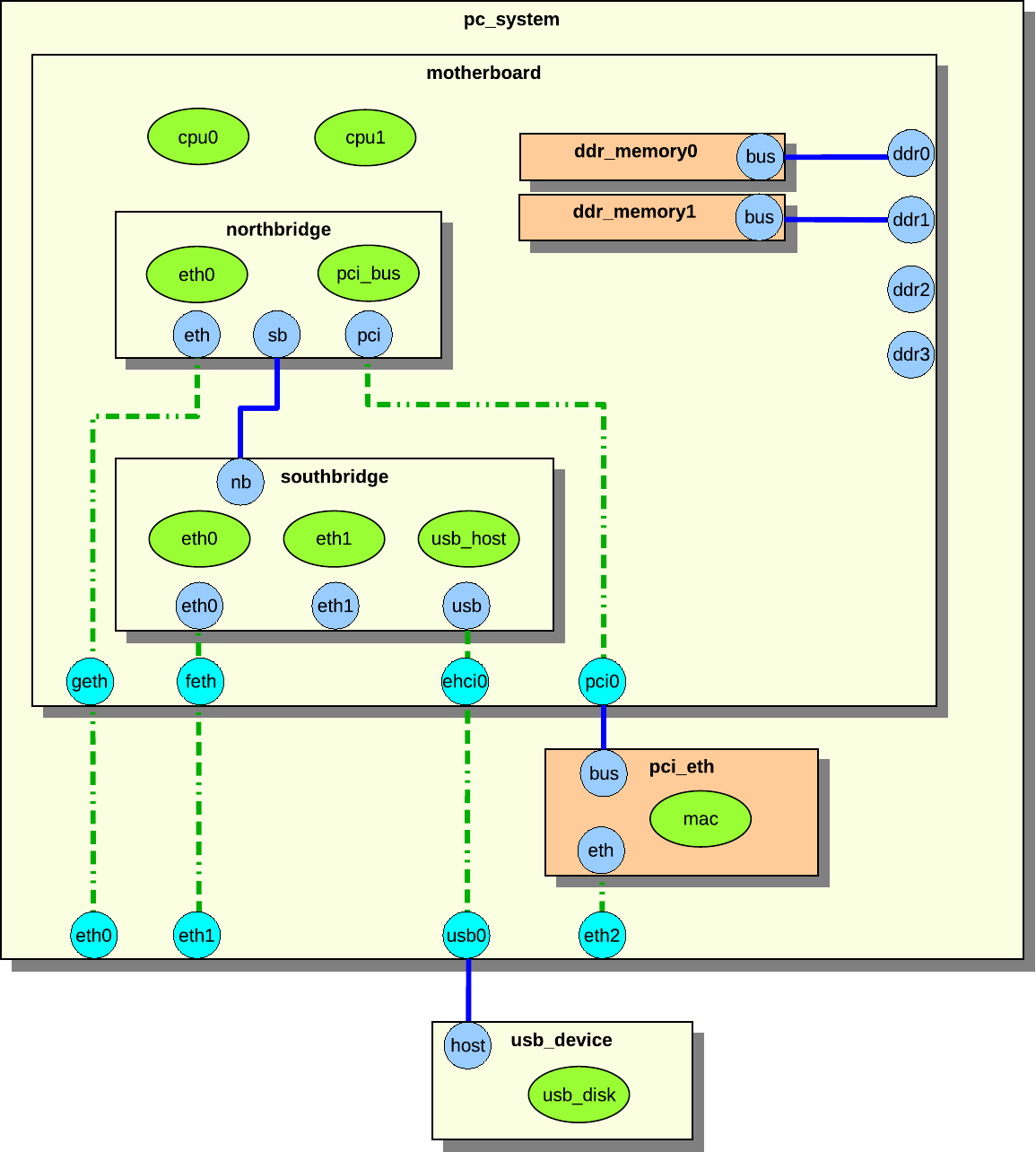
This section describes a hierarchical system with components. We use the simple
PC system in figure 32 as an example.
Figure 32. Example hierarchical
system
The system in figure 32 consists of the
pc_system, motherboard, northbridge, southbridge, pci_eth,
usb_device, and two ddr_memory components.
The components contains both regular objects (drawn as ellipses in the figure),
and sub components (drawn as rectangles with drop shadows). An object can be a
processor, device, or an extension. Remember that an extension is something that
add simulation functionality, such as a trace object.
The blue and cyan circular objects on the edge of the components are connectors.
A blue connector is a connector that is owned by the component it is in. A cyan
connector is an inherited connector from another component. An inherited
connector can also be seen as a reference connector. The dashed line shows how
the connector has been inherited. The connector called eth in northbridge
has been inherited to motherboard as geth, and geth has been inherited by
pc_system as eth0. The pc_system component could inherit eth directly
from northbridge, but that is not the case in this example. We will not
distinguish reference connectors from real connectors in this section, as they
look identical to an outside observer. Only the component designer who sets up
the system needs to be aware of the distinction.
Connectors can be connected to other connectors, forming connections. The solid
blue lines in the figure are connections. Two connectors can only be connected
if they belong to components that are on the same hierarchical level, or if one
of the components is a sub component of the other. The northbridge and
southbridge components are on the same level, and they can connect to each
other through their connectors. The ddr_memory and motherboard components
can be connected because the ddr_memory components are sub components of
motherboard.
The pc_system component contains all components in its component tree except
usb_device. Both pc_system and usb_device are on the same level—in this
case, the so-called root level.
The pci_eth and ddr_memory0_1 components have a different color to indicate
that they were not defined in the pc_system component, but added at runtime.
The pc_system.ddr2_3 connectors have not been connected to any component.
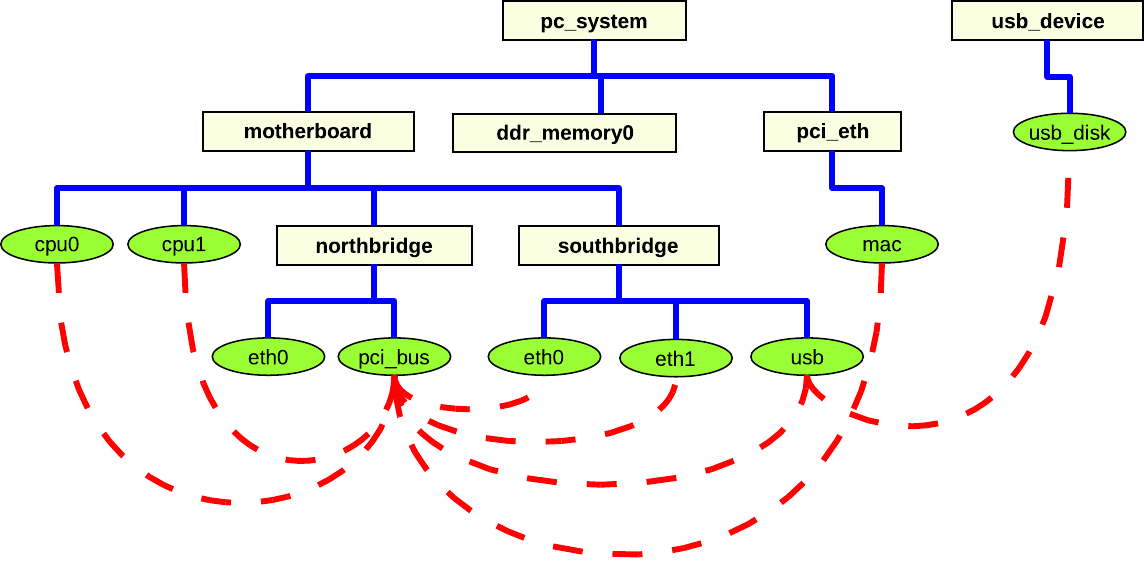
Figure 33. Object connections in a
hierarchical system
It is actually objects that must be connected (see section
26.7.2); the component connectors merely provide a
way of sending the data between components needed for setting up the object
attributes. Figure 33 shows the components and the
objects from figure 32, but now the actual
connections between the objects are in focus. The dashed lines between the
objects show how the objects are connected. A lot of the objects are connected
to the pci_bus object. This is very common on a generic PC system. Even
objects that are not in the same component tree are connected, e.g., the usb
object and the usb_disk object.
This section describes how to create a system consisting of only root components
in component hierarchies. Although it is better to create hierarchical system
models as shown in the example in section 26.7.2,
the creation of flat systems is supported. The flat system modeling concept is
primarily useful when modeling a system that is best described as a “collection
of peers”, such as a rack of computers. Additionally, several standard system
models provided with Simics are implemented as flat systems, since hierarchical
components were not supported when these systems were built. It is expected that
all such systems will be upgraded to hierarchical models over time.
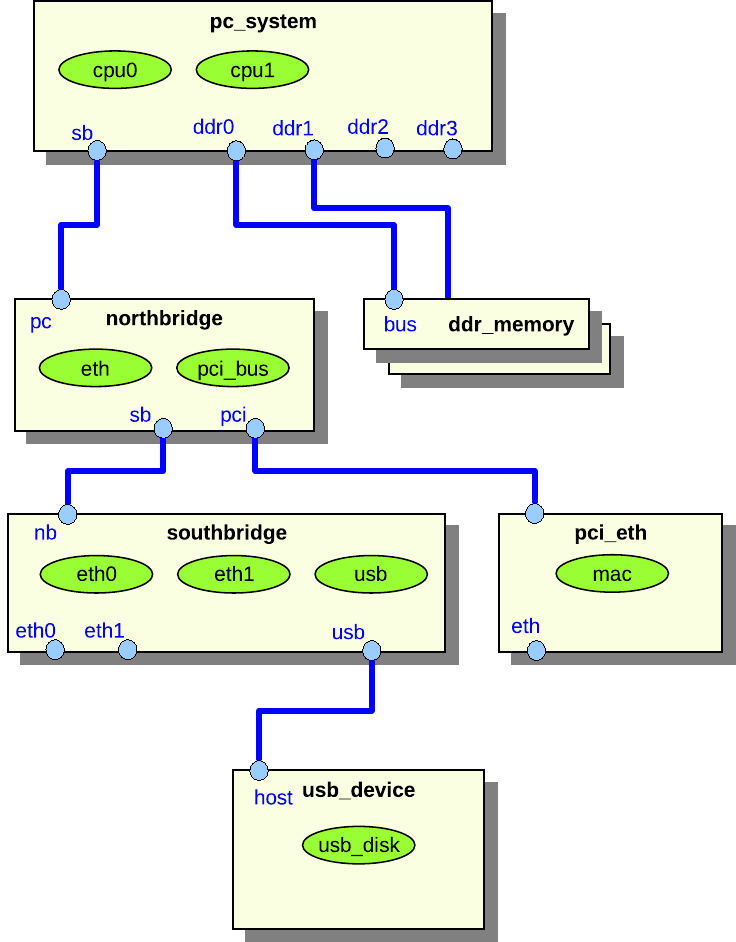
Figure 34. Example of a flat
system
Figure 34 shows a flat system representation of
the system shown in figure 32. The difference is
that there are no hierarchical components in figure
34.
The biggest advantage of hierarchical systems over flat systems is clarity. In a
hierarchical configuration, objects, commands, and attributes are only
accessible via their hierarchical name in the hierarchy, and do not clutter the
top-level namespace. This is particularly important for large systems with many
objects. Consider a big rack with several boards, each with several devices and
processors. Simics requires that all objects at the same level of the namespace
have unique names. Thus, objects of the same type in different parts of the
system either need long, essentially hierarchical, names; or else the user must
remember which randomly named objects make up which part of the system. Using
hierarchy reduces complexity by providing a system for naming.
This section references the set of interfaces that every component is required to
implement. These interfaces ensure that the component works with Simics commands
and the API that operates on components:
All required component commands are either provided by the comp Python module
or generated by project-setup as described in 26.6.1.
The standard info and status commands will need to be extended to be
relevant to the actual component.
This section documents the set of attributes that every component is required to
implement. These attributes ensure that the component works with Simics commands
and the API that operates on components.
Note that some attributes are marked as optional. This means that the value of
the attribute does not need to be specified, not that the attribute does not
need to be implemented.
We draw a distinction between attributes that define the state of a given
instance of a component, and class attributes that are the same for all
instances of a given component class.
Optional attribute; read/write access; type: dictionary or nil.
Dictionary with objects that the component consists of. The dictionary key is
the name of the slot including array index as a string and the value is a single
object or None.
This attribute is only valid if the top_level attribute is TRUE. List of
components below the top-level component. This attribute is not valid until the
object has been instantiated.
This attribute is only valid if the top_level attribute is TRUE. List of all
processors below the top-level component. This attribute is not valid until the
object has been instantiated.
Optional attribute; read/write access; type: string or nil.
This attribute is only valid if the top_level attribute is TRUE. An instance
of a top-level component may override the default system_icon with its own
icon. This attribute is the name of an 80x80 pixel large icon in PNG format that
should reside in the [host]/lib/images directory of the Simics installation or
the project.
This attribute is only valid if the top_level attribute is TRUE. A short
single-line description of the current configuration of the system that the
component is a top-level component of. The line may include the Linux name of
the simulated machine, the installed operating system, or similar information.
For example “Tango - Fedora Core 5 Linux”.
Pseudoclass attribute; read-only access; type: string or nil.
This attribute is only valid if the top_level attribute is TRUE. Name of an 80
by 80 pixel icon in PNG format used to graphically represent the system that the
component is a top-level of.
It is recommended that some standard attribute names are used for common
component characteristics. Such attributes are used by the Simics Control window
in the GUI for example to collect information. The attributes only need to be
readable.
Components with memory that should be included in the count
of total system memory should have this attribute representing the amount of
memory in MiB. This is not needed if the component is connected to memory DIMM
components.
Storage devices should implement the disk_component interface that is used by
the GUI to present information about the total amount of attached disk storage
in a system.
The majority of a component’s state is checkpointed via the attributes that are
used to configure it. There are also separate attributes that are only used for
checkpointing, discussed in sections 26.6.5 and
26.8.3.
Other data that should be checkpointed includes state calculated or received
during the connection phase, since it may be needed to support later
reconfiguration for hotplugging components.
All information about connectors and connections is checkpointed automatically
by the connector objects in the components.
All Simics configuration objects that handle time in any way must have their
queue attribute set. A queue makes time advance, and makes it possible to post
events. Any object that implements the cycle interface can be used as a queue;
the only objects that currently do this are processors and objects of the class
clock. All objects that have the same queue are said to be part of the same
time domain.
The component system automatically sets the queue attribute for all objects at
instantiation time, based on the component hierarchy. To override the automatic
queue assignment, for example on multiprocessor boards where each processor
should be its own queue, simply assign the queue attribute when adding the
pre-configuration objects.
When building a model of an asymmetric multiprocessor board which logically
consists of multiple systems, create multiple sub components rather than
spending time manually setting queue attributes.
Devices that handle input, such as serial and network devices, keyboards, and
mice, usually implement a connection to a recorder object. All their input
passes through the recorder so that it may record the input to a file and later
replay the same input from that file.
The component system automatically creates a recorder and connects it to all
input devices that have a recorder attribute. A component can override this
automatic assignment by setting the recorder attribute itself for its objects.
Since components are implemented as Python classes, it is easy to create new
components that are similar to existing ones by using inheritance. Instead of
basing the component on the StandardComponent base class, another component
class can be used. The new component class can, for example, remove unnecessary
connectors, add new connectors, add new objects, and override methods.
Components may be added and removed from the configuration during simulation.
This can be used to simulate the effects of changes in the simulated hardware,
e.g., plugging in a new board into a rack or unplugging a network cable.
The connectors to the component must be set to support hotplugging to allow
connection or disconnection during simulation. You can even instantiate an
extension to an existing configuration using hotplugging.
When a connector representing a link is disconnected, all in-flight messages on
the link are discarded.
If a component is disconnected, i.e., all of its connectors are disconnected,
communication to and from the component is stopped. Both the objects within
component and the rest of the configuration continues to be simulated.
Additionally, any communication within the component continues. To stop the
simulation in the component while continuing simulation in the rest of the
configuration (e.g., simulating power-off of a component), you have to
explicitly add this functionality to the models. The models should remove the
events that they have posted on any event queues. The queue attributes will be
set to Nil by Simics after the disconnection.
If a component is connected again to some other part of the configuration, the
queue attributes of the objects making up the component are automatically set
to a queue inside the new top-level component. If a specific queue is needed, it
should be passed along in the connect data and be assigned in the connect
method. Simics will not touch queue attributes that are set by the connect
method. The component should notify its models about being hotplugged, so that
they can repost their events on the new queue.
The following is a list of common connector types found in many of the
architecture models implemented by Simics. Machine-specific connector types are
not described in this section. The tables list all connector directions and the
data that should be passed for connectors of each direction, including check
data if it is different from the connect data.
The data listed for each connector type should be returned by the
get_connect_data function in the component_connector interface, which is
implemented by all components. The check data should be returned by the
get_check_data function in the component interface. See the section
26.6.10 for more information how to implement connectors.
Used to connect cPCI cards to a backplane component wrapping the standard PCI
bus. The backplane component, defining the down connector, must make sure that
the pci-bus pre-configuration object has the pci_devices and bridge
attributes initialized.
down
[<PCI device number>, <PCI bus object>]
up
[[[<PCI function number>, <PCI device object>, <is_bridge>]*]]
Used to connect datagram_link devices and datagram links. Up and down
datagram-link connectors cannot be connected. They have to be connected to an
any connector.
Used to connect Ethernet devices and Ethernet links. Up and down
ethernet-link connectors cannot be connected. They have to be connected to an
any connector.
Note also that when using old-style Ethernet links (of class ethernet-link)
only, the arguments provided by the up and down connectors will be ignored and
can be skipped.
Connection for SDRAM components providing SPD information. The connect function
should make sure that only SDRAM of the correct type and width is inserted in a
memory slot.
Used to connect PCI devices to a standard PCI bus. A component defining the
down connector must make sure that the pci-bus pre-configuration object has
the pci_devices attribute set.
Used to connect PCMCIA (PC-CARD) devices into a PCMCIA controller. The
arguments exported by the up connector is expected to change in a future Simics
version.
Used to connect serial devices together, and to different kinds of serial
consoles. When implementing a down connector make sure to use the name of the
serial device object in the console title. This makes it easier to identify the
console in a system with several consoles. Either the link argument or the
console/device must be supported, but not both.
The API Reference Manual documents the classes and methods implemented in the
comp Python module. This section documents the default implementation of the
methods in the component interface in the StandardComponent class. This
section does not duplicate the documentation of StandardComponent methods not
part of the component interface, for example get_slot, which are documented
in the reference manual in the Python-specific API section of the API chapter.
Standard implementation, see the component interface. The function adds a
dynamic slot named slot if it does not already exist. It returns True if it
could add the slot.
Returns cell creation status for component. The default behavior depends on
the automatic_cell_partition attribute in the sim object and if the
component is a top-level component.
Standard implementation, see the component interface. The function deletes
the dynamic slot named slot. The function returns True if it could remove
the slot, otherwise it returns False.
Standard implementation, see the component interface. The function returns
True if there exists a static or dynamic slot named slot in the component,
otherwise it returns False.