NGINX with Intel® QuickAssist Technology (Intel® QAT) Optimization Guide
Table of Contents
- Overview
- QAT Hardware Requirements
- QAT Software Requirements and Prerequisites
- Enabling the Required QAT Services
- asynch_mode_nginx Configuration
- Supporting Files
- Benchmarking
- Results
- Details
- References
Overview
Compression and cryptography consume a significant portion of data-center CPU resources. Intel® QuickAssist Technology (Intel® QAT) can offload compression and encryption operations, allowing CPU cores to perform other work while improving compression and cryptography performance.
NGINX is an open source web server distributed under a simplified two-clause BSD-like license. The asynch_mode_nginx project adds asynchronous capabilities to NGINX by using the OpenSSL asynchronous infrastructure.
This guide describes how to configure and build asynch_mode_nginx with QATzip for compression offload and QATEngine for TLS handshake acceleration. The benchmark environment described below uses the upstream in-tree QAT kernel driver on Ubuntu 24.04.
QAT Hardware Requirements
At least one compatible Intel® QAT PCI endpoint is required.
Check for a compatible QAT device
The following command checks for the 4xxx-series PCI device IDs targeted by this guide:
count=0
for id in 4940 4941 4942 4943 4944 4945 4946 4947; do
    count=$((count + $(lspci -d 8086:$id 2>/dev/null | wc -l)))
done

echo "$count matching 4xxx-series QAT endpoints found."
At least one matching endpoint is required. On the system used for this benchmark, the output was:
8 matching 4xxx-series QAT endpoints found.
Verify the required firmware
Verify the firmware pair applicable to the installed device family. Each family uses a main firmware file and a corresponding MMP firmware file:
ls -l /lib/firmware/qat_4xxx.bin /lib/firmware/qat_4xxx_mmp.bin 2>/dev/null
ls -l /lib/firmware/qat_402xx.bin /lib/firmware/qat_402xx_mmp.bin 2>/dev/null
ls -l /lib/firmware/qat_420xx.bin /lib/firmware/qat_420xx_mmp.bin 2>/dev/null
Only the firmware pair required by the installed device must be present. For example, a device using the qat_402xx driver should report:
/lib/firmware/qat_402xx.bin
/lib/firmware/qat_402xx_mmp.bin
If the required firmware is unavailable, obtain the applicable files from the Linux firmware repository. The following example installs the qat_402xx pair:
cd ~
wget https://git.kernel.org/pub/scm/linux/kernel/git/firmware/linux-firmware.git/plain/intel/qat/qat_402xx.bin
wget https://git.kernel.org/pub/scm/linux/kernel/git/firmware/linux-firmware.git/plain/intel/qat/qat_402xx_mmp.bin
sudo cp qat_402xx.bin qat_402xx_mmp.bin /lib/firmware/
rm qat_402xx.bin qat_402xx_mmp.bin
After installing firmware on Ubuntu 24.04, rebuild the initramfs and reboot:
sudo update-initramfs -u
sudo reboot
The initramfs command differs by Linux distribution.
Verify the kernel driver
Check whether the QAT kernel modules are loaded:
lsmod | grep qat
Example output:
qat_4xxx 16384 0
intel_qat 172032 1 qat_4xxx
If the modules are not loaded, load the core and applicable device-specific modules:
sudo modprobe intel_qat
sudo modprobe qat_4xxx
If modprobe fails, inspect the QAT options in the running kernel configuration:
grep -i qat /boot/config-$(uname -r)
Verify CONFIG_CRYPTO_DEV_QAT and the applicable device-specific option:
CONFIG_CRYPTO_DEV_QAT_4XXXCONFIG_CRYPTO_DEV_QAT_402XXCONFIG_CRYPTO_DEV_QAT_420XX
The required driver must be built as a module (=m) or into the kernel (=y). If the option is absent or set to n, the fix is a kernel that includes it: a newer distribution kernel, a vendor kernel, or a locally rebuilt kernel with the option enabled.
Each device generation also has a minimum kernel version, so a kernel older than the following will not have the driver regardless of configuration:
- 4xxx: Linux v5.15.3 or later
- 402xx: Linux v6.4 or later
- 420xx: Linux v6.8 or later
The QATlib System Requirements page documents the complete kernel, firmware, and boot-parameter requirements, including the per-device minimum kernel versions and the intel_iommu=on boot parameter noted below.
QAT Software Requirements and Prerequisites
This guide uses the upstream in-tree QAT kernel driver supplied with Ubuntu 24.04.
Install the build dependencies documented by the QATlib User’s Guide for asynch_mode_nginx on Ubuntu:
sudo apt-get update
sudo apt-get install -y \
    build-essential \
    zlib1g-dev \
    libssl-dev \
    libpcre3 \
    libpcre3-dev
Install QATlib, including its development package:
sudo -E apt install -y \
    libqat4 \
    libqat-dev \
    qatlib-service \
    qatlib-examples \
    libusdm-dev
QATlib provides the user space libraries that allow QAT device access and expose APIs for use by higher level applications.
QATzip is a user-space library built on top of the QATlib user-space library. It provides extended compression and decompression capabilities by offloading these operations to Intel® QAT accelerators. Install QATzip and its development package:
sudo -E apt install -y \
    qatzip \
    libqatzip3 \
    libqatzip-dev
Install QATEngine for TLS acceleration:
sudo -E apt install -y qatengine
Ensure the following kernel parameter is enabled, and reboot if a change is required:
intel_iommu=on
Enabling the Required QAT Services
Each QAT device can be configured in either Managed Mode, the preferred method for this application, or Standalone Mode. The two main parameters configured in /etc/sysconfig/qat are POLICY and ServicesEnabled.
POLICY indicates how many Virtual Functions (VFs) are assigned to each process. ServicesEnabled is set based on the following table.
| ServicesEnabled | Services available |
|---|---|
dc |
Compression/decompression only |
sym |
Symmetric crypto only |
asym |
Asymmetric crypto (public key) only |
sym;dc |
Symmetric crypto and compression |
asym;dc |
Asymmetric crypto and compression |
This matters because the two optimizations in this guide use different services:
ngx_http_qatzip_filter_modulerequires the compression servicedc.ngx_ssl_engine_qat_modulewith QATEngine requires the cryptographic serviceasymfor the TLS handshake workload.
A device whose PFs are left at the default service mix will not reliably accelerate TLS, and the Connections Per Second (CPS) results below cannot be reproduced on it.
Newer QAT kernel modules support the combined asym;dc service configuration. Because this workload uses both asym and dc, the QATlib asynch_mode_nginx guidance recommends POLICY=2; a workload using only one of the two services can use POLICY=1.
Configure /etc/sysconfig/qat as follows:
POLICY=2
ServicesEnabled=asym;dc
Restart the QAT service:
sudo systemctl restart qat
Confirm the active configuration:
qat --status
The qat script can also be used to configure the QAT devices without editing /etc/sysconfig/qat, and it reports the configuration that is currently live on each VF. This is described in further detail in the qat script section of the QATlib documentation.
Available service combinations vary by QAT generation, and not all services can be enabled on a single device simultaneously. Consult the QATlib User’s Guide for the combinations supported by the installed hardware.
asynch_mode_nginx Configuration
Tested Software Versions
| Component | Version |
|---|---|
asynch_mode_nginx |
1.0.0 |
| NGINX | 1.26.2 |
| OpenSSL | 3.0.13 |
| QATEngine | 2.0.0-1~noble1 |
QATEngine is selected by nginx_with_qat.conf through the use_engine qatengine directive.
Package Dependencies
The ./configure line below is the one documented on the QATlib asynch_mode_nginx page. The installed Ubuntu development packages provide the build headers and libraries in the standard compiler and linker search paths:
libssl-dev: OpenSSL headers and development librarieszlib1g-dev: zlib headers and development librarylibpcre3-dev: PCRE headers and development librarylibqatzip-dev:qatzip.hand the QATzip development library, used byngx_http_qatzip_filter_module
ngx_ssl_engine_qat_module reaches the accelerator through the OpenSSL ENGINE API rather than the QATlib API, so it includes no QATlib headers and no QAT source tree is required to build it. libqat4, libqat-dev, and libusdm-dev remain required for QATEngine and USDM at run time.
If you build against an OpenSSL outside the distribution packages, add its include and library paths to --with-cc-opt and --with-ld-opt accordingly.
Building
Obtain the asynch_mode_nginx source:
cd "$HOME"
git clone https://github.com/intel/asynch_mode_nginx.git
cd asynch_mode_nginx
Configure with support for encryption and data compression, following the QATlib User’s Guide:
export NGINX_INSTALL_DIR=/usr/local/nginx_qat_module
sudo mkdir -p "$NGINX_INSTALL_DIR"

./configure \
    --prefix="$NGINX_INSTALL_DIR" \
    --with-http_ssl_module \
    --add-dynamic-module=modules/nginx_qatzip_module \
    --add-dynamic-module=modules/nginx_qat_module/ \
    --with-cc-opt="-DNGX_SECURE_MEM -Wno-error=deprecated-declarations" \
    --with-ld-opt="-lqatzip -lz"

make -j"$(nproc)"
sudo make install
The configuration files in supporting_files/ assume the /usr/local/nginx_qat_module prefix used above.
Generating the Server Certificate
Both supporting configurations expect a certificate and key in the installation directory. These are not created by the build, so generate them before starting the server. The published results use a 2048-bit RSA key (RSA2K):
sudo mkdir -p "$NGINX_INSTALL_DIR/certs"

sudo openssl req -x509 -newkey rsa:2048 -nodes -days 365 \
    -keyout "$NGINX_INSTALL_DIR/certs/server.key" \
    -out "$NGINX_INSTALL_DIR/certs/server.crt" \
    -subj "/CN=localhost"

sudo chmod 600 "$NGINX_INSTALL_DIR/certs/server.key"
This self-signed certificate is suitable for benchmarking, not production.
Validating the Configuration
Validate both configurations before benchmarking. This confirms that each one parses and that the dynamic modules it loads are present:
"$NGINX_INSTALL_DIR/sbin/nginx" -t \
    -c /path/to/supporting_files/nginx_with_qat.conf

"$NGINX_INSTALL_DIR/sbin/nginx" -t \
    -c /path/to/supporting_files/nginx_without_qat.conf
A successful check reports:
nginx: configuration file /path/to/nginx_with_qat.conf test is successful
This step catches missing module paths, unreadable certificates, and syntax errors before they show up as a failed test run.
Supporting Files
The QAT-enabled configuration follows the QATlib User’s Guide pattern by loading the QATzip and QATEngine NGINX modules, enabling QATEngine asynchronous offload, and using the asynch HTTPS listener.
| File | Purpose |
|---|---|
supporting_files/nginx_with_qat.conf |
Configuration with the QAT modules loaded and QATEngine enabled. |
supporting_files/nginx_without_qat.conf |
Baseline with the QAT modules disabled. It still uses the asynchronous listener and must run with the asynch_mode_nginx binary. |
supporting_files/connection_test.sh |
Runs the CPS handshake test using openssl s_time. |
images/nginx_qat_comparison_intel_amd.png |
CPS results chart. |
Benchmarking
Run the connection test with:
./supporting_files/connection_test.sh <server_ip>
Print the commands without running them with:
./supporting_files/connection_test.sh <server_ip> --emulation
The script starts 200 concurrent openssl s_time clients, runs each for 10 seconds, and sums the reported connection rates. The client count, duration, port, and cipher are set in the USER INPUT block at the top of the script.
Benchmark Profile
The benchmark artifacts must use the same TLS protocol, cipher or cipher suite, certificate type, worker count, and client settings as the published result.
The current supporting files default to TLS 1.2 with AES128-SHA. The results chart represents a TLS 1.3 ECDHE-X25519-RSA2K test. Therefore, the current defaults demonstrate the test method but do not reproduce the chart without modification.
For each benchmark, capture:
"$NGINX_INSTALL_DIR/sbin/nginx" -V
openssl version -a
qat --status
uname -a
Core Allocation and worker_processes
Both supporting configurations set:
worker_processes 48;
The QATlib User’s Guide example uses worker_processes auto;. This benchmark intentionally fixes the value at 48 to evaluate throughput under a constrained worker allocation.
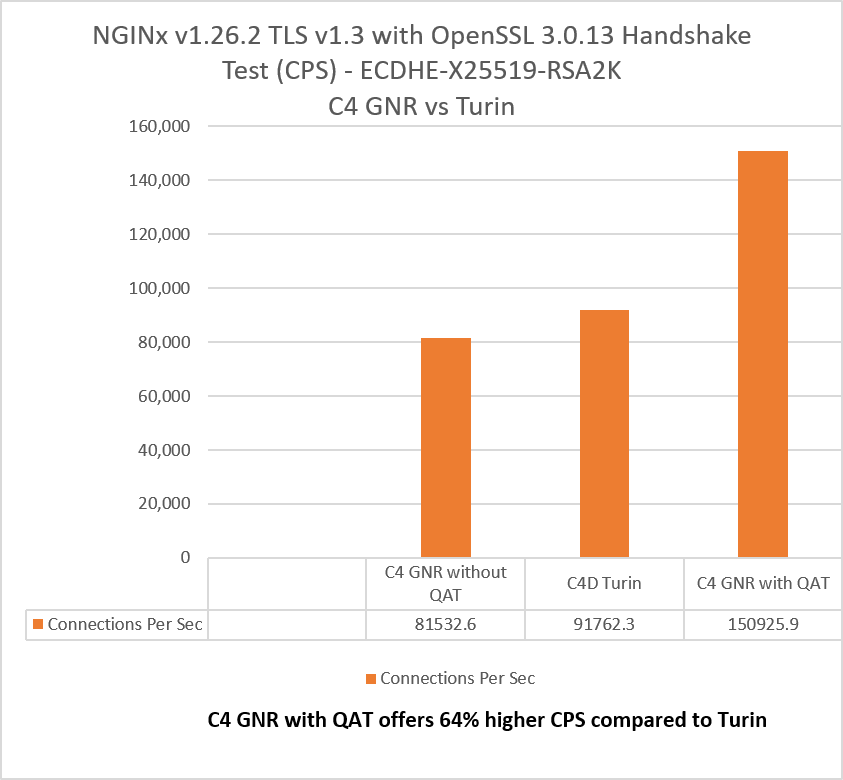
With the same 48-worker allocation, the QAT-enabled configuration delivered higher CPS than the configuration without QAT. This comparison does not by itself measure utilization or performance of workloads on the remaining cores.
Results
Intel® QAT is only exposed on bare-metal cloud instances, so this comparison is run there rather than on virtualized shapes.
The two C4 GNR results use the same bare-metal Intel® Xeon® 6985P system (c4-highmem-288-metal) with worker_processes 48. Both use the same host, NGINX build, worker count, and benchmark duration. The QAT-enabled test loads the QAT modules and enables QATEngine, corresponding to nginx_with_qat.conf; the baseline leaves those components disabled while retaining the same asynchronous NGINX binary, corresponding to nginx_without_qat.conf.
The C4D Turin system is also bare metal, keeping the provisioning model consistent for the cross-platform comparison.
Reproducibility note: The repository’s current TLS 1.2 defaults do not reproduce the TLS 1.3 ECDHE-X25519-RSA2K chart. See Benchmark Profile.
Details
NGINX on GNR
- Instance:
c4-highmem-288-metal, bare metal - Processor: Intel® Xeon® 6985P
- Cores: 144
- TDP: 500 W
- Hyper-Threading: enabled
- Turbo: enabled
- NUMA nodes: 6
- Memory: 2232 GB
- Microcode:
0x1000380 - QAT engines: 4
- Operating system: Ubuntu 24.04 LTS
- Kernel:
6.14.0-gcp - Test date: October 6, 2025
asynch_mode_nginx: 1.0.0- NGINX: 1.26.2
- OpenSSL: 3.0.13
- QATEngine: 2.0.0
NGINX on Turin
- Instance:
c4d-highmem-384-metal, bare metal - Processor: AMD EPYC™ 9B45
- Cores: 192
- Hyper-Threading: enabled
- Turbo: enabled
- NUMA nodes: 2
- Memory: 3072 GB
- Microcode:
0xb002150 - Operating system: Ubuntu 24.04 LTS
- Kernel:
6.14.0-gcp - Test date: October 6, 2025
asynch_mode_nginx: 1.0.0- NGINX: 1.26.2
- OpenSSL: 3.0.13
Results may vary.