Add Customized Pattern
Introduction
The Neural Engine in Intel® Extension for Transformers support user to add customized pattern of model, which means you can compile your own pretrained model to Neural Engine IR (Intermediate Representation) just by adding the specific patterns which the compile does not contain.
The intermediate graph in Neural Engine can be treated as a list that stores all nodes of the model under control flow. Some certain nodes may compose a pattern which needs to be fused for speeding up inference. For simplifying the network structure, we also design different attributes attached to fused nodes. To aim at adding a customized pattern, there are three steps: 1. register the nodes’ op_types; 2. set the pattern mapping config and register the pattern; 3. fuse pattern and set attributes of the new pattern after fusion.
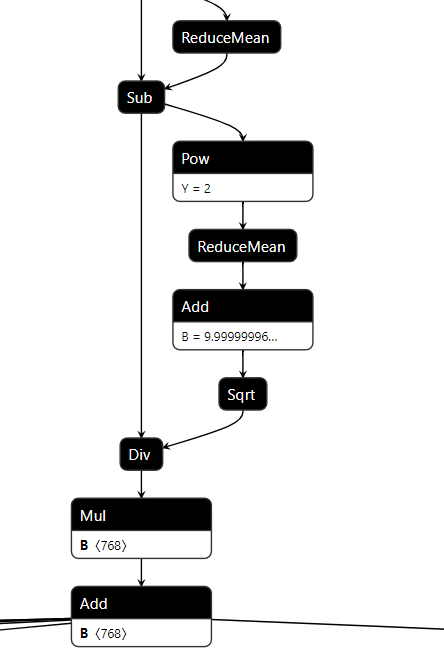
Above is a LayerNorm pattern in the Distilbert_Base onnx model. Assume it is a customized pattern in your model that need to be added in compile. Follow the steps below to make Neural Engine support this pattern, and fuse these 9 nodes to one node called LayerNorm.
Register the Nodes’ Op Types
First, you should check whether the nodes’ op_types in the pattern are registered in Engine or not. If not, you need to add the op_type class for compile loading and extracting the origin model. All the ops can be found from the compile.ops. For quick check, use the commands below.
# make sure you have cloned intel_extension_for_transformers repo and installed intel_extension_for_transformers
from intel_extension_for_transformers.transformers.runtime.compile.ops.op import OPERATORS
# All the op_type names and objects are stored in `OPERATORS`
print(OPERATORS)
The print result will show all registered ops, for example:
{'Gelu': <class 'intel_extension_for_transformers.transformers.runtime.compile.ops.gelu.Gelu'>, 'Unsqueeze': <class 'intel_extension_for_transformers.transformers.runtime.compile.ops.unsqueeze.Unsqueeze'>, 'OptimizeDataset': <class 'intel_extension_for_transformers.transformers.runtime.compile.ops.optimize_dataset.OptimizeDataset'>, 'IteratorV2': <class 'intel_extension_for_transformers.transformers.runtime.compile.ops.iterator_v2.IteratorV2'>, 'QuantizeLinear': <class 'intel_extension_for_transformers.transformers.runtime.compile.ops.quantize_linear.QuantizeLinear'>, 'Gather': <class 'intel_extension_for_transformers.transformers.runtime.compile.ops.gather.Gather'>, 'GatherV2': <class 'intel_extension_for_transformers.transformers.runtime.compile.ops.gather.GatherV2'>, 'GatherElements': <class 'intel_extension_for_transformers.transformers.runtime.compile.ops.gather_elements.GatherElements'>, 'Unpack': <class 'intel_extension_for_transformers.transformers.runtime.compile.ops.unpack.Unpack'>, 'MapAndBatchDataset': <class 'intel_extension_for_transformers.transformers.runtime.compile.ops.map_and_batch_dataset.MapAndBatchDataset'>, 'Concat': <class 'intel_extension_for_transformers.transformers.runtime.compile.ops.concat.Concat'>, ...}
These ops can be roughly divided into two categories, the one is without attributes, like Mul, the other one is with attributes, for example, Reshape has the attributes dst_shape. You can look through the executor for more info about the Neural Engine ops’ attribute settings.
Assume the Sqrt and ReduceMean in LayerNorm pattern are new op_types for compile. Here are the examples that show how to register them.
Sqrt has no attributes. You can add this op class in compile.ops.empty_ops.
# register the 'Sqrt' class in OPERATORS
@operator_registry(operator_type='Sqrt')
# all ops class will inherit the father class 'Operator'
class Sqrt(Operator):
    def __init__(self):
        super().__init__()
ReduceMean has keep_dims and axis two attributes, you need to set them by extracting the node from the origin model.
Create a python file (for example, name can be reduce_mean.py) in compile.ops and add the ReduceMean op class.
In this LayerNorm pattern, the ReduceMean node in origin onnx model just has axes value which is a list, that is the value of axis attribute comes from. The keep_dims attribute is False by default in executor, so if the ReduceMean node has the keep_dims attribute, you should extract and set it. Otherwise, you can just ignore it.
from .op import Operator, operator_registry
from .tensor import Tensor
from ..graph_utils import list2str

@operator_registry(operator_type='ReduceMean')
class ReduceMean(Operator):
    def __init__(self):
        super().__init__()
    # rewrite the 'set_attr' function to set the attributes
    def set_attr(self, framework, node):
        # other frameworks may also have the 'ReduceMean' op_type
        if framework == 'onnxruntime':
            # if node has 'keep_dims' attribute in origin model
            if len(node.attribute) == 2:
                axis = node.attribute[1].ints
                self._attr['keep_dims'] = bool(node.attribute[0].i)
            # if node has not 'keep_dims' attribute in origin model
            if len(node.attribute) == 1:
               axis = node.attribute[0].ints
            # in this 'LayerNorm' pattern, the axis just have on element in a list
            if len(axis) == 1:
                self._attr['axis'] = axis[0]
            # if the axis list have several element, change the list to string
            # for example, [1, 2, 3] --> '1,2,3'
            else:
                self._attr['axis'] = list2str(axis)
After adding the two op classes, you can use the OPERATORS to check whether them be added successfully or not. Please do not forget reinstall the intel_extension_for_transformers in local for making your code changes effective.
# enter into the <intel_extension_for_transformers> folder
cd <you_work_dir>/intel_extension_for_transformers/
pip install -r requirements.txt
# reinstall the intel_extension_for_transformers locally
pip install -v .
# check your code changes
from intel_extension_for_transformers.transformers.runtime.compile.ops.op import OPERATORS
'Sqrt' and 'ReduceMean' in OPERATORS
If nothing wrong, the output result should be True.
Set the Pattern Mapping Config and Register the Pattern
In Neural Engine, we treat the pattern fusion as the process of pattern mapping: from a group nodes to another group nodes. In this step, you need to provide a config for pattern_mapping function and register your pattern, in order to make sure the compile implements pattern fusion correctly.
Create a python file (for example, name can be
layer_norm.py) incompile.sub_graphand add theLayerNormpattern mapping config.For the above
LayerNormpattern, the config example can be like this:# LayerNorm in distil_bert_base pattern_mapping_config = { 'LayerNorm': [ { 'patterns': { 'in': [[(0, 'ReduceMean'), (1, 'Sub'), (2, 'Pow'), (3, 'ReduceMean'), (4, 'Add'), (5, 'Sqrt'), (6, 'Div'), (7,'Mul'), (8, 'Add')]], 'out': [[(0, 'LayerNorm')]] }, 'search_mode': 'op_type', 'node_names': { 0: 8 }, 'input_tensors': { 0: [[{ 0: [0] }, { 7: [1] }, { 8: [1] }], [[0, 1, 2], 3]] }, 'output_tensors': { 0: [[{ 8: [0] }], [[0], 1]] }, 'returns': [4] }, ] }
The dict in the config will guide the
pattern_mappingfunction on how to find all the group nodes that belong toLayerNormpattern in intermediate graph and how to replace them with new pattern. We use this config to store many dicts because different models (even the same model) could have different representations for a certain pattern. If you want to delve into it, please see pattern_recognize and graph_fusion docs for more details.Register the
LayerNormpatternLike the node op_type, the new pattern also need to be registered. You can check the existing pattern classes by the commands below.
from intel_extension_for_transformers.transformers.runtime.compile.sub_graph.pattern import PATTERNS
print(PATTERNS)
The print result will show all registered patterns, for example:
{'Gelu': <class 'intel_extension_for_transformers.transformers.runtime.compile.sub_graph.gelu.Gelu'>, 'TokenTypeEmbeddings': <class 'intel_extension_for_transformers.transformers.runtime.compile.sub_graph.token_type_embeddings.TokenTypeEmbeddings'>, 'TransposeBatchMatMul': <class 'intel_extension_for_transformers.transformers.runtime.compile.sub_graph.transpose_batch_matmul.TransposeBatchMatMul'>, 'TokenTypeEmbeddingsV1': <class 'intel_extension_for_transformers.transformers.runtime.compile.sub_graph.token_type_embeddings_v1.TokenTypeEmbeddingsV1'>, 'LayerNormWithReduceMean': <class 'intel_extension_for_transformers.transformers.runtime.compile.sub_graph.layer_norm_with_reduce_mean.LayerNormWithReduceMean'>, ...}
In order to complete the
LayerNormpattern registration, write a related classes in the python file you created before and put the pattern mapping config in.from .pattern import Pattern, pattern_registry from collections import namedtuple, OrderedDict from .. import graph_utils as util @pattern_registry(pattern_type='LayerNorm') class LayerNorm(Pattern): def __call__(self, model): pattern_mapping_config = { 'LayerNorm': [ # LayerNorm in distil_bert_base { 'patterns': { 'in': [[(0, 'ReduceMean'), (1, 'Sub'), (2, 'Pow'), (3, 'ReduceMean'), (4, 'Add'), (5, 'Sqrt'), (6, 'Div'), (7,'Mul'), (8, 'Add')]], 'out': [[(0, 'LayerNorm')]] }, 'search_mode': 'op_type', 'node_names': { 0: 8 }, 'input_tensors': { 0: [[{ 0: [0] }, { 7: [1] }, { 8: [1] }], [[0, 1, 2], 3]] }, 'output_tensors': { 0: [[{ 8: [0] }], [[0], 1]] }, 'returns': [4] }, ] }
After save this python file, you can check it by retrieving the
PATTERNSfrom intel_extension_for_transformers.transformers.runtime.compile.sub_graph.pattern import PATTERNS 'LayerNorm' in PATTERNS
If nothing wrong, the output result should be
True.
Fuse Pattern and Set Attributes of New Pattern after Fusion
Define the pattern fusion order
Fusing patterns should follow specific order if a model has multiple patterns. For example, if the model has A pattern (nodes: a–>b) and B pattern (nodes: a–>b–>c), and B pattern is actually equivalent to A pattern + c node. So you should fuse A pattern first, then B pattern (more info and details please see the graph_fusion).
There is a list called
supported_patternsincompile.sub_graph.pattern. It controls the order of pattern fusion. You need to add your customized pattern name (thepattern_typeyou register in step 2) intosupported_patternsat appropriate location (If a pattern does not influence other patterns, you can put it at an arbitrary location).For example, change the
supported_patternslike:supported_patterns = [ 'InputData', 'A pattern' ... 'LayerNorm', 'B pattern', ... 'OutputData', ]
Replace the pattern with new pattern
According to the pattern mapping dict in step 2, add these two lines below to get the intermediate graph after pattern fusion.
# get the above LayerNorm pattern dict pattern_dict = pattern_mapping_config['LayerNorm'][0] # get the intermediate graph (model) after fuse LayerNorm pattern # new_node_name and ret_old_nodes are used for set attributes later model, new_node_names, ret_old_nodes = util.pattern_mapping('LayerNorm', pattern_dict, model)
Set the attributes of new pattern
Every new pattern generated after fusion could have its attributes (when we talk about pattern attributes, it stands for the operator’s attributes in the pattern, which are defined by the
executor). As forLayerNormpattern, the above 9 nodes are fused to one node with op_typeLayerNorm. This operation has an attributeepsiloninexecutor, which is a value added to the denominator for numerical stability.We recommend to write a
_set_attrfunction and call it after pattern mapping to set the nodes’ attributes. Here is the example forLayerNormpattern.def _set_attr(epsilon, node_names, model): attr = OrderedDict() # set the `epsilon` attribute attr['epsilon'] = float(epsilon) ln_node_idx = model.get_node_id(node_names[0]) # make the LayerNorm node in model have the corresponding attribute model.nodes[ln_node_idx].attr = attr # LayerNorm pattern mapping pattern_dict = pattern_mapping_config['LayerNorm'][0] model, new_node_names, ret_old_nodes = util.pattern_mapping('LayerNorm', pattern_dict, model) # if the model has the above LayerNorm pattern if len(new_node_names) != 0: # set the LayerNorm node attribute for j in range(len(new_node_names)): # get the epsilon value from the ret_old_nodes epsilon = ret_old_nodes[j][0].input_tensors[1].data _set_attr(epsilon, new_node_names[j], model) return model
Here gives the complete code of the LayerNorm pattern config, pattern fusion and attributes setting.
from .pattern import Pattern, pattern_registry
from collections import namedtuple, OrderedDict
from .. import graph_utils as util

@pattern_registry(pattern_type='LayerNorm')
class LayerNorm(Pattern):
    def __call__(self, model):

        pattern_mapping_config = {
            'LayerNorm': [
                # LayerNorm in distil_bert_base
                {
                    'patterns': {
                        'in': [[(0, 'ReduceMean'), (1, 'Sub'), (2, 'Pow'), (3, 'ReduceMean'),
                                (4, 'Add'), (5, 'Sqrt'), (6, 'Div'), (7,'Mul'), (8, 'Add')]],
                        'out': [[(0, 'LayerNorm')]]
                    },
                    'search_mode': 'op_type',
                    'node_names': {
                        0: 8
                    },
                    'input_tensors': {
                        0: [[{
                            0: [0]
                        }, {
                            7: [1]
                        }, {
                            8: [1]
                        }], [[0, 1, 2], 3]]
                    },
                    'output_tensors': {
                        0: [[{
                            8: [0]
                        }], [[0], 1]]
                    },
                    'returns': [4]
                },
            ]
        }
# general LayerNorm node attribute setting function
def _set_attr(epsilon, node_names, model):
attr = OrderedDict()
attr['epsilon'] = float(epsilon)
ln_node_idx = model.get_node_id(node_names[0])
model.nodes[ln_node_idx].attr = attr
# use for-loop because you may add other LayerNorm pattern mapping dict
# when meeting other different models
for i in range(len(pattern_mapping_config['LayerNorm'])):
# replace all the LayerNorm pattern in the model
pattern_dict = pattern_mapping_config['LayerNorm'][i]
model, new_node_names, ret_old_nodes = util.pattern_mapping('LayerNorm', pattern_dict, model)
if len(new_node_names) != 0:
# set the LayerNorm node attribute
for j in range(len(new_node_names)):
epsilon = ret_old_nodes[j][0].input_tensors[1].data
_set_attr(epsilon, new_node_names[j], model)
return model
# if a model has not any LayerNorm pattern in the pattern_mapping config,return
return model
After finishing these three steps in compile, reinstall intel_extension_for_transformers and then use compile function would compile your model with the customized pattern.
Note:
The pattern mapping function just supports pattern after fusion is sequence for now, like [a–>b–>c] or [a]. So if the customized pattern after fusion is too complicated, you had better decompose it.
The
executormay not support the operators’ implementation of the customized pattern after fusion, you need to add them in theexecutorby yourself.